Focus Won't Hold, Moving Subjects Blur? Lock It With AE/AF Lock
Published Jun 27, 2026
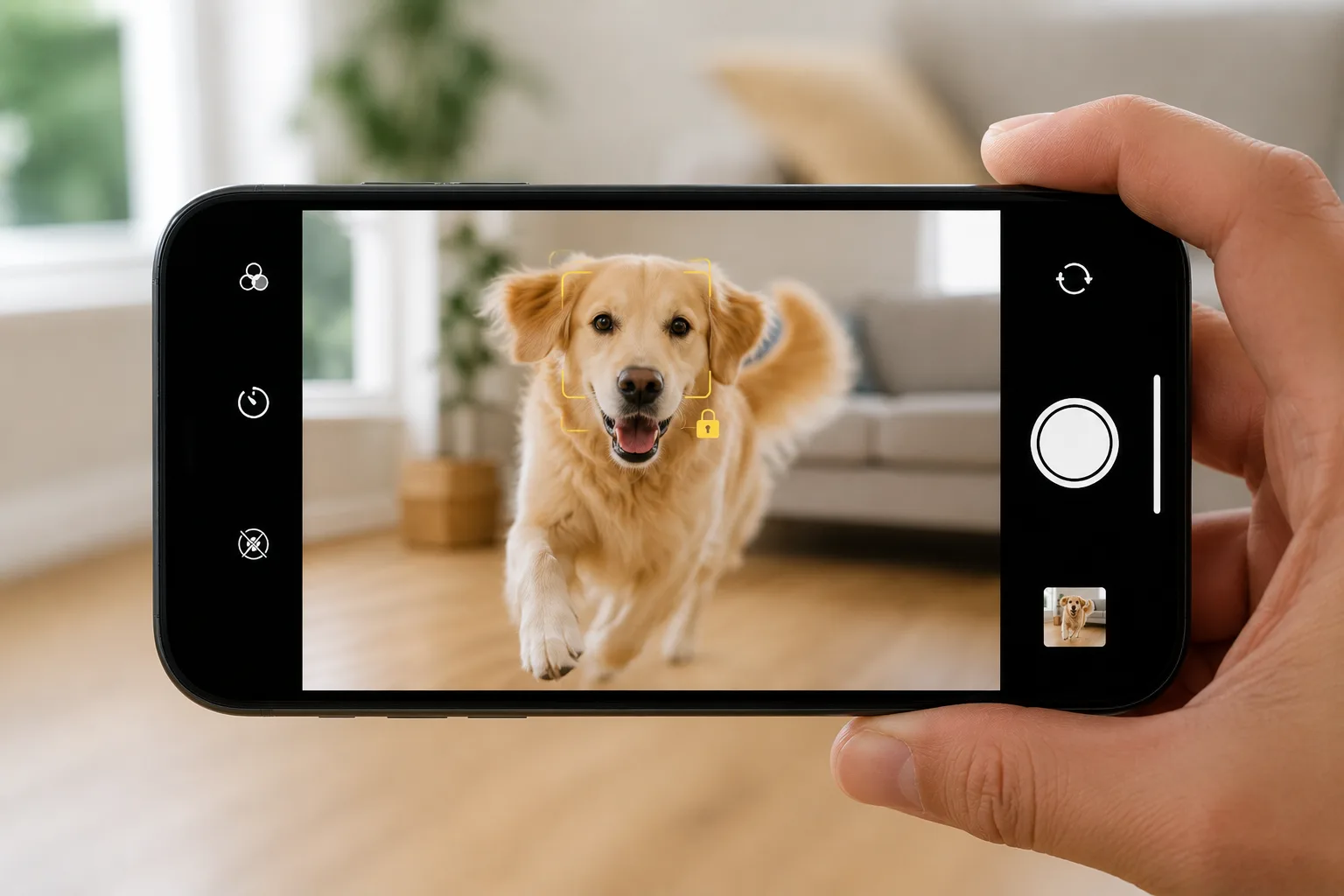
“Focus slips to the background the instant I press the shutter.” “It blurs when I get close.” This wandering steadies once you lock the focus — and you can do it with just your phone’s stock camera.
Why focus wanders
The camera re-reads focus and brightness every time the subject or framing changes. With a moving subject, or a scene with things both near and far, it can land somewhere other than where you meant. The idea is to lock it in advance and stop that wandering.
How to use it (iPhone / Android)
Press and hold the spot you want in focus. On iPhone the focus box glows yellow and an “AE/AF LOCK” banner appears (on Android, a lock icon or similar) — that means it’s locked. Frame your shot and press the shutter. While locked, focus and brightness hold even if the subject moves a bit or you pan the camera.
If you want to change only the brightness after locking, swipe up or down on the screen to adjust (→ Exposure compensation basics).
Scenes it suits
It helps with pets and kids running around, subjects behind a fence or glass, and moving in close over food from the front. When focus wanders in the dark of a night scene, locking onto a bright light source steadies it.
Start with just this
Press and hold to lock the spot you want in focus → frame and shoot → tap to release when done. That alone sharply cuts down on focus slipping and wandering.
FAQ
What is AE/AF Lock?
It locks focus (AF) and brightness (AE). Press and hold the screen to lock them, and focus and brightness won't change even if the subject moves or you pan the camera.
How do I release the lock?
Tap anywhere on the screen once to release it. After you've finished shooting, a light tap gets you ready for the next shot.
Related reading
Related subject guides

Capturing Dogs' and Cats' Expressions — Fixing Motion, Darkness and Blur

Capturing Kids' Natural Expressions — Fixing Blur and Darkness

How to Make Food Look Delicious — Why It Looks Bland and How to Fix It

Shooting Night Views and Illuminations Crisp — Why They Blur, and Night Mode

Shooting Faces and Food Bright Even in Backlight — Why It Goes Dark and the Fix
Shooting the Moon Clearly — Why It Becomes a White Dot, and What a Phone Can Do
Shooting Kids Sharp at Sports Day — Fixing Blur, Distance and Backlight